Amazon PPC
How To Generate 20–65% More Organic Sales Without Raising Your Ad Budget
Paying more for Amazon ads but organic sales won’t move? 5 tactics to turn PPC into ranking and grow organic sales 20–65% without raising your ad budget.

Vadim Soin16 min read
On this page
You’re pumping $50K+ into Amazon ads every month – but year after year, growth stalls, and every dollar spent feels like renting shelf space. Contrast: What if instead of watching your ad spend climb, a bigger slice of your revenue came from organic search? What if the same $50K ad budget suddenly drove 20–65% more sales because paid ads were building rank instead of burning cash?
In the old playbook, sellers obsess over ACOS and click costs. But the truth is brutal: your ads shouldn’t just grab clicks – they should earn permanent sales. Once Amazon’s algorithm rewards you with a rank, continuing to pay for those same clicks is literally paying for revenue you already own. As one veteran consultant puts it, if “you have to keep feeding ads to make sales, you’re not growing. You’re paying rent.” In other words, Ads = Ranking, not Sales.
What You’ll Learn: Step-by-step tactics (backed by real data) to flip that script. You’ll discover hidden PPC leaks, rewrite your budget strategy, and ignite organic sales – all without increasing spend.
Are You Stuck Spending More on Ads Without Growing Organic Sales?
Take a look at your Amazon account.
Are your ad costs going up while your organic sales stay the same?
If that’s happening, there is a good chance your ads are working harder than they should.
One of the easiest ways to check is by looking at your TACoS (Total Advertising Cost of Sales).
TACoS compares your ad spend to your total sales, including both ad sales and organic sales.
Here is a simple example:
You spend $1,000 on ads.
Those ads generate $1,000 in sales.
At first glance, that looks terrible because your ACoS is 100%.
But what if those ads also helped you generate another $9,000 in organic sales?
Now your total sales are $10,000.
Your TACoS is only 10%.
The ads did more than generate sales. They helped improve your visibility, which brought in extra organic orders.
This is why looking at ACoS alone can give you the wrong picture.
There is another problem that catches many sellers.
You may be paying for sales that would have happened anyway.
Let’s say your product already ranks near the top of Amazon for a keyword.
A shopper searches for that keyword.
They would probably have found your product naturally.
But instead, they click your ad.
You pay for the click.
You pay for the sale.
The customer was likely coming to you either way.
That is called PPC cannibalization.
Your ad spend increases, but your business does not gain much in return.
In one example, a seller stopped advertising on several keywords where they already ranked highly. Their monthly ad spend dropped by thousands of dollars, yet their order volume stayed almost the same.
The important question is not whether your ads generate sales.
The important question is whether your ads are helping your business gain more organic sales over time.
Organic sales are what turn advertising from an expense into an investment.
The rest of this guide will show you how to make that happen.
Your Organic Health Check: 5 Questions to Ask
Before changing anything, spend a few minutes reviewing your account.
These questions will help you find weak spots that may be limiting organic growth.
1. Is Your TACoS Staying the Same or Going Up?
As organic sales increase, TACoS should slowly move down.
If it stays flat for months or keeps rising, your ad spend may not be creating enough organic growth.
2. How Much of Your Revenue Comes From Organic Sales?
A healthy product usually earns most of its sales organically once it has been established in the market.
If a large share of your revenue still comes from PPC after many months, review your listing, keywords, and overall visibility.
3. Which Keywords Generate the Most Revenue?
Every account has a handful of keywords that drive most of the results.
These are your hero keywords.
Find them.
Track them.
Protect them.
They deserve more attention than the hundreds of keywords that produce very little revenue.
4. Are You Advertising on Keywords You Already Rank Well For?
Look at your top-performing PPC keywords.
Then check where you rank organically.
If you already appear near the top of search results, test reducing ad spend on those keywords and watch what happens.
You may discover that some of those sales continue even without the ads.
5. Is Your Listing Converting Visitors Into Buyers?
Ads can bring people to your listing.
They cannot make people buy.
If shoppers are clicking but not purchasing, look closely at your main image, title, reviews, pricing, and product page content.
A weak listing can waste a lot of traffic.
If any of these questions uncovered a problem, don’t worry.
Many of these issues can be improved without increasing your ad budget.
Now let’s look at the actions that can help turn more of your paid traffic into organic growth.
5 Tactical Levers to Boost Organic Sales
1. Find Your Hero Keywords and Give Them Special Treatment
Not all keywords deserve the same amount of attention.
In many Amazon accounts, a handful of keywords generate a large share of sales. These are your hero keywords.
A hero keyword is a search term that brings in a lot of revenue and has the potential to improve your organic ranking.
For example, if you sell yoga pants, “high-waisted yoga pants” might drive far more sales than dozens of other keywords combined.
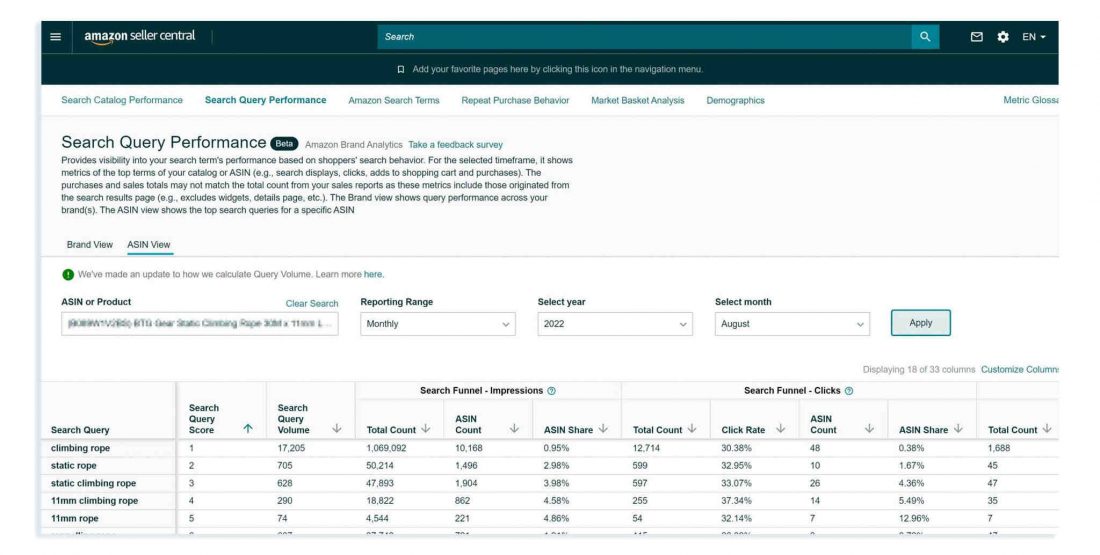
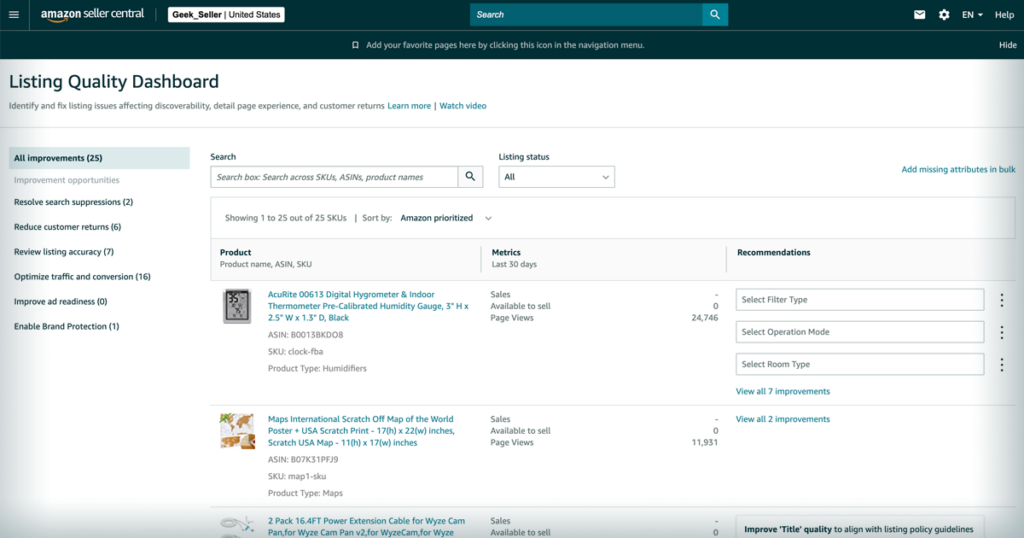
The first job is to find these keywords. Look at your advertising reports and Search Query Performance data. Focus on the keywords that generate the most revenue and the most orders.
Once you identify them, treat them differently from the rest of your account.
During a launch or ranking campaign, it can make sense to spend more aggressively on these keywords, even when the ACoS looks high. The goal is to increase visibility and improve organic ranking. One seller spent heavily on a single keyword and reached the top organic position. After that, organic sales from that keyword grew several times what they were before.
As your ranking improves, give each hero keyword its own campaign. This makes it easier to control budgets, bids, and placements. It also helps you see exactly what is happening without other keywords getting in the way.
When a keyword reaches strong organic positions, keep watching it. If rankings remain stable, you may be able to reduce ad spend and move that budget elsewhere. If rankings begin to fall, increase support again until the position recovers.
The goal is simple: use advertising to build stronger organic rankings, then spend only what is needed to maintain them.
Hero Keyword Priority Table
| Keyword Type | How Much Attention It Gets | Main Goal |
|---|---|---|
| Hero Keyword | Very High | Improve ranking and grow organic sales |
| Mid-Level Keyword | Medium | Generate profitable sales |
| Low-Impact Keyword | Low | Collect data and identify opportunities |
A useful exercise is to list your top 10 keywords by revenue. Then highlight the 3-7 keywords that contribute the most sales. Those are usually the keywords that deserve the largest share of your attention and budget.
2. Stop Paying for Sales You Would Have Received Anyway
One of the easiest ways to waste advertising money is to keep running ads on keywords where your product already ranks near the top of Amazon’s search results.
Imagine someone searches for a keyword where your product appears in one of the top organic positions.
That shopper would probably have seen your product even without the ad.
But instead, they click the sponsored listing.
You pay for the click.
You pay for the sale.
The customer may have purchased from you anyway.
This is one reason some sellers spend more on ads than necessary.
The first thing to do is test your keywords.
Look at the keywords where your product ranks highly in organic search. Choose one keyword and reduce or pause the advertising for one to two weeks. Then compare your total sales.
If sales remain close to the same level, there is a good chance that the keyword does not need as much advertising support as before.
Next, review your search term reports.
You may notice that broad and automatic campaigns are spending money on keywords that are already performing well in your exact-match campaigns. When that happens, use negative keywords to block unnecessary overlap and direct more budget toward new opportunities.
Campaign structure also matters.
Broad and automatic campaigns are useful when you are looking for new keywords. Once a keyword proves itself, move it into its own exact-match campaign where you have more control. This helps prevent multiple campaigns from competing for the same search term.
Any budget that becomes available should be moved to areas that can create more growth. This could be hero keywords, new keyword opportunities, or listing improvements that help increase conversions.
The goal is simple: spend money where it creates new growth, not where it pays for sales you already have.
Budget Review Table
| Situation | Keep Spending? | Why |
|---|---|---|
| Keyword ranks on page 3 or lower | Yes | More visibility is still needed |
| Keyword ranks on page 1 and sales drop after pausing ads | Yes | Ads are still helping generate sales |
| Keyword ranks on page 1 and sales stay stable after pausing ads | No | The product is already getting enough visibility |
| Broad campaign and exact campaign target the same keyword | Reduce overlap | Prevent unnecessary spending |
Before reducing spend, always test first. A keyword that looks unnecessary today may still be helping maintain visibility. The numbers should guide the decision.
3. Improve Your Listing So More Visitors Become Buyers
Advertising can bring thousands of people to your product page.
That does not mean they will buy.
A shopper makes a decision based on what they see when they land on your listing. If the listing does not build confidence, many visitors will leave without placing an order.
This is why improving your listing can increase both paid sales and organic sales without increasing your advertising budget.
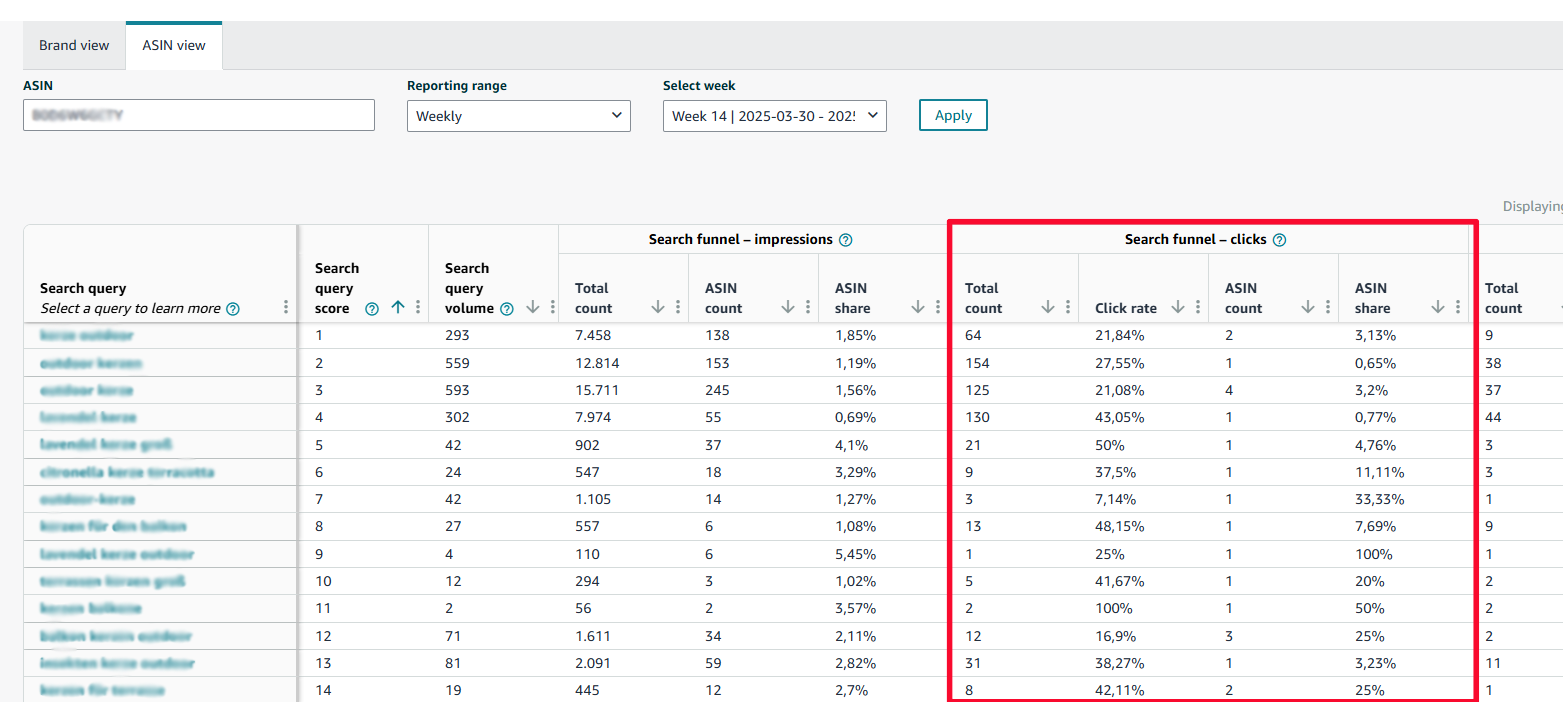
A good place to start is Amazon’s Search Query Performance report.
This report helps you understand where shoppers are losing interest.
If many people see your product but very few click on it, your main image or title may not be doing its job.
If people click but do not buy, the problem is usually somewhere on the product page itself. The price may be too high. The reviews may be weaker than competing products. The images may not answer important questions. The product description may leave shoppers uncertain.
The report helps point you toward the area that needs attention.
Next, compare your conversion rate with other products in your category.
Your conversion rate tells you how many visitors become customers.
If similar products convert better than yours, study the differences. Look closely at their images, titles, reviews, videos, product descriptions, and pricing. The goal is to understand why shoppers feel more comfortable buying from them.
Another area worth reviewing is your backend search terms.
These are keywords that shoppers never see, but Amazon uses to understand your product.
Many listings contain outdated backend keywords or leave valuable space unused. Review them regularly and include relevant search terms, alternate names, and common variations that describe your product.
Finally, look at your pricing, reviews, and delivery speed.
Imagine two similar products.
One has stronger reviews, a better price, and arrives tomorrow.
The other costs more and arrives in five days.
Many shoppers will choose the first option.
Your ranking may be strong, but if competitors offer a better buying experience, visitors may still choose them instead.
The purpose of this exercise is to remove the obstacles standing between a click and a purchase.
Listing Problem Finder
| What You See | What It Usually Means | Area To Review |
|---|---|---|
| Lots of impressions, few clicks | Shoppers are not interested enough to click | Main image and title |
| Lots of clicks, few purchases | Visitors are not convinced to buy | Price, reviews, images, content |
| Good traffic, weak conversion rate | Competitors are doing a better job | Entire product page |
| Good traffic and good conversion, but low visibility | More shoppers need to discover the product | Keywords and ranking strategy |
Before spending more on advertising, make sure your listing is giving visitors a strong reason to buy. A stronger listing allows every advertising dollar to produce more revenue.
4. Put Your Budget Where It Creates the Most Growth
Once you know your hero keywords and have reduced unnecessary ad spend, the next job is deciding where your budget should go.
Many Amazon accounts spread money across too many campaigns.
A better approach is to send more of your budget toward the keywords and products that are helping your business grow.
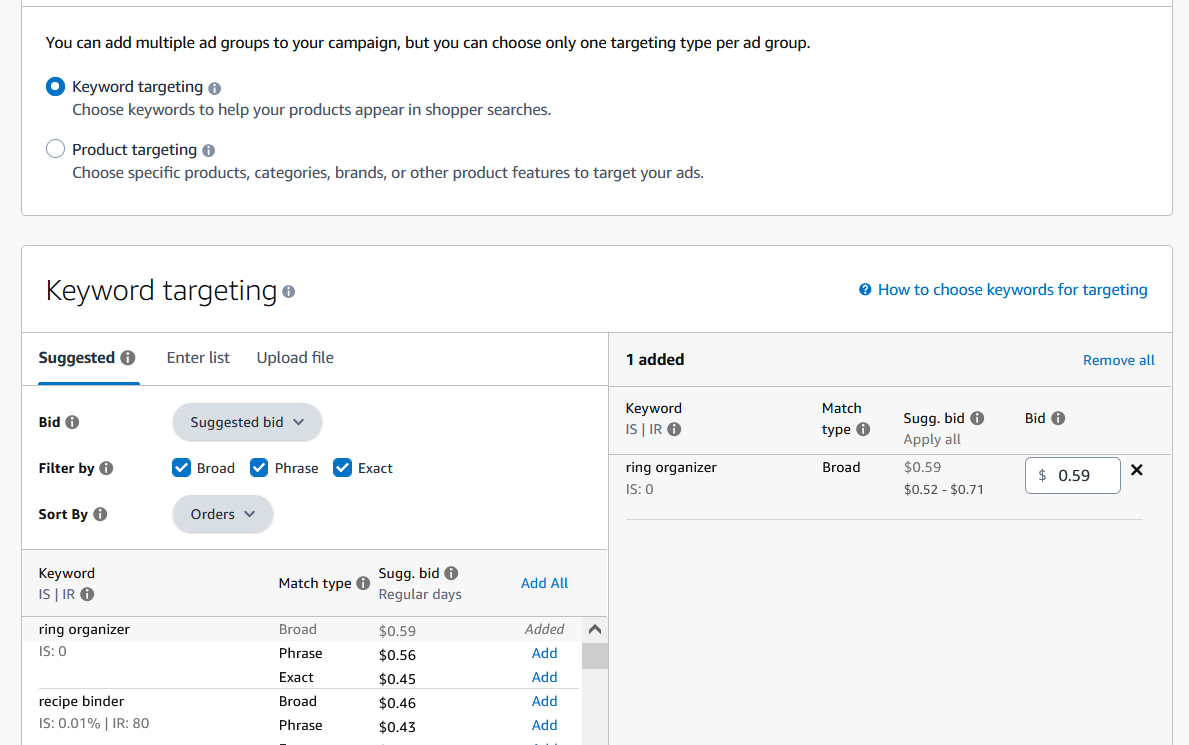
Start with your hero keywords.
These are the keywords that generate a large share of your sales and have the biggest impact on organic ranking. It often makes sense to dedicate a large portion of your Sponsored Products budget to these keywords, even when the advertising cost looks higher than you would like.
Why?
Because a strong ranking can continue producing sales long after the ad click has happened.
At the same time, keep some budget available for finding new opportunities.
New search terms, seasonal trends, and related products can all become future hero keywords. If you spend every dollar on today’s winners, you may miss tomorrow’s opportunities.
It is also worth looking at products that already generate strong organic sales.
If a product receives most of its sales organically, it may not need as much advertising support as before. In some cases, reducing ad spend on these products can free up budget for products that still need help gaining visibility.
Pricing deserves attention, too.
When a product ranks well organically and continues to sell consistently, there may be room for a modest price increase. Higher organic visibility often gives you more flexibility because customers are finding your product naturally.
Finally, be careful about creating new campaigns without a clear purpose.
Every campaign should have a job.
Some campaigns help you discover new keywords.
Some campaigns help you improve rankings.
Some campaigns help you protect profitable keywords.
When campaigns overlap too much, money gets spread across activities that produce very little return.
The goal is to direct more of your budget toward the areas that help organic sales grow over time.
Budget Allocation Guide
| Situation | Budget Priority |
|---|---|
| Hero keyword with ranking potential | High |
| Product heavily dependent on PPC after many months | Medium-High |
| New keyword opportunity worth testing | Medium |
| Product already generating strong organic sales | Low |
| Duplicate or overlapping campaigns | Lowest |
Before increasing your total ad budget, review where your current budget is going. Many accounts already have enough advertising spend. The problem is that too much of it is flowing to the wrong places.
5. Keep Watching the Numbers That Matter
Getting more organic sales is not a one-time project.
Amazon changes constantly.
Competitors update their listings.
New products enter the market.
Search trends change throughout the year.
A keyword that performs well today may perform differently a few months from now.
That is why regular monitoring matters.
Start by reviewing your TACoS and organic sales every week.
As organic sales grow, TACoS should gradually move down. If organic sales stay flat while ad spend remains the same or increases, something needs attention. This could be a ranking issue, a listing issue, stronger competition, or a change in customer demand.
Next, keep an eye on your hero keywords.
Check where they rank each week organically.
If rankings stay stable, continue monitoring.
If rankings begin to fall, consider increasing support through advertising, promotions, or listing improvements. The earlier you notice a decline, the easier it is to recover.
Every month, perform a full account review.
Look at your products one by one.
Compare your current numbers with the previous month.
Review organic sales, TACoS, keyword rankings, and advertising dependence.
The purpose is not to find perfect numbers.
The purpose is to spot changes before they become larger problems.
A simple scorecard can help.
Track your most important products and record the same numbers every month. Over time, trends become easier to see. Instead of reacting to surprises, you can make decisions based on clear data.
Monthly Organic Growth Scorecard
| Product | Organic Sales Growing? | TACoS Moving Down? | PPC Dependence | Status |
|---|---|---|---|---|
| Product A | Yes | Yes | Low | Healthy |
| Product B | No | No | High | Needs Attention |
| Product C | Yes | Flat | Medium | Monitor Closely |
| Product D | No | Rising | High | Investigate |
| Product E | Yes | Yes | Low | Healthy |
The goal is not to check numbers every hour. The goal is to build a simple routine that helps you spot problems early and identify products that are moving toward stronger organic growth.
Case Study: How One Brand Doubled Its Organic Take
Specialized Kitchen Tools: Before coaching, they were at $250K/mo revenue, spending $100K/mo on ads (40% of sales). Organic was just 30% of the total. We implemented these steps:
- Focused Heroes: Identified 5 hero keywords (e.g., “premium chef knife”, “ceramic cookware”). Created single-keyword campaigns for each. Spent 2X on launch budgets there, pushing them into the top 5 organic spots.
- Killed Cannibalization: Paused all campaigns on keywords where Brand X ranked #1–5. Their sales barely dipped. As a result, ad spend dropped 20% immediately, freeing budget.
- Listing Overhaul: Used SQP data to find leaks: For “ceramic cookware”, clicks were low. We rewrote bullets and added A+ images. Click-through jumped 15%. We also refreshed backend keywords with long-tails (e.g., “nonstick pot set”), immediately lifting impressions for those terms.
- Budget Re-shuffle: Redirected the freed 20% budget into new keywords (like “stainless steamer” category terms) and into fighting for feature-rich placements on heroes. We let those hero campaigns run high at ~120% ACOS to maximize rank.
- 30-Day Push: Monitored daily. After 30 days, organic sales share climbed from 30% to 50%. TACoS fell from 40% to 32%. ACOS went up to ~80% on hero terms, but overall profit margins increased (because organic revenue surged). Sales broke through to $300K/mo by Month 2 (20% more) – all without adding a cent in ad budget.
The result? Today, 6 months later, Brand X is pulling 65% of its sales organically. Ad spend stays flat, but total sales have grown ~50%. Their business got stronger, not more expensive – exactly by using ads as a growth tool instead of an expense sink.
Your 30-Day Action Plan
Reading about a strategy is one thing.
Applying it inside your account is where results come from.
Use the next 30 days to work through the actions below.
Week 1: Understand Where You Stand
Start by looking at the last 90 days of data for your main products.
Calculate your TACoS and review how much of each product’s sales come from PPC.
Pay close attention to products that depend heavily on advertising. If more than half of a product’s sales come from PPC after several months on the market, that product deserves a closer look.
Next, review your top 10 keywords by ad spend.
Check where each keyword ranks organically.
Highlight any keyword where your product already appears near the top of Amazon’s search results.
Those keywords will become important later.
Week 2: Review Your Listing
Open your Search Query Performance reports and study your top search terms.
Look for places where shoppers lose interest.
If people see your product but do not click, review your main image and title.
If people click but do not buy, review your pricing, reviews, images, and product page content.
At the same time, review your backend search terms.
Remove anything outdated and include relevant keywords that describe your product.
Week 3: Reallocate Your Budget
Choose one hero keyword that already performs well.
Increase its budget and monitor performance closely.
At the same time, begin reducing spend on keywords where your product already ranks strongly and where advertising may no longer be necessary.
Review broad and automatic campaigns.
If they are spending money on search terms already covered elsewhere, reduce the overlap and redirect that budget toward higher-value opportunities.
Week 4: Measure What Changed
Compare your numbers with the beginning of the month.
Review your TACoS.
Review your organic sales.
Review your keyword rankings.
Look for products that have become less dependent on advertising and products that have gained stronger organic visibility.
If a product did not improve, go back through the earlier sections and identify what still needs attention. Sometimes the issue is the listing. Sometimes it is the keyword strategy. Sometimes it is how the budget is being used.
By the end of 30 days, you should have a much clearer picture of where your money is helping your business grow and where it is simply maintaining the status quo.
The purpose of this plan is not to change everything at once. The purpose is to identify the areas creating the biggest impact and focus your effort there first.
None of this relies on magic software. It’s simple math and Amazon data. Every number you use is baked into your account: TACoS, PPC Units %, SQP metrics. Use them ruthlessly.
The Bottom Line
You’ve seen the blueprint: shift from penny-wise ad management to smart, profit-driven strategy. This isn’t about making fancy funnels or motivational fluff – it’s about cold, hard results. As one PPC expert said: “If your TACoS isn’t decreasing and organic isn’t increasing, you have a major issue”.
It’s your choice. Keep blindly bidding on keywords you already own, and watch Amazon quietly take its cut. Or invest 20 minutes today to apply these tactics, and reclaim those sales for good.
Start with the first step: run the numbers on your TACoS and PPC dependency. If the math isn’t working in your favor yet, you know exactly what to do next. The opportunity is real, the strategy is proven – now it’s in your hands.
Get A Free PPC & Organic Growth Audit
If you’re spending $3K+/month on ads and want to find out what’s preventing your PPC from generating more organic sales, book a free PPC Growth Audit.
During the audit, I’ll personally review your account and identify the biggest opportunities to increase organic sales, improve rankings, and reduce wasted ad spend.
Brands I’ve worked with have generated an additional $77,361 in revenue in 60 days, reduced ACoS by up to 50%, and uncovered growth opportunities hidden inside their PPC accounts.